This chapter explains where the plugin UI is displayed, how it is rendered, and how to listen for button press events.

Where the Plugin UI Renders

In Plugin Principles, we described the plugin event chain. After a button is tapped, the event is sent to PluginHost: Plugin event handling flow After receiving the press event, PluginHost selects the target plugin UI by plugin identifier and renders it into its own container view. React Native UIs are described in JS/TS, but they must be rendered by a native container view on Android. A typical approach is to use ReactRootView as the root container, which loads JS/TS and renders to the screen. PluginHost also maintains a ReactRootView (or an equivalent container). All plugin UIs are mounted into this container; PluginHost uses the plugin identifier in the event to decide which plugin App entry to render.
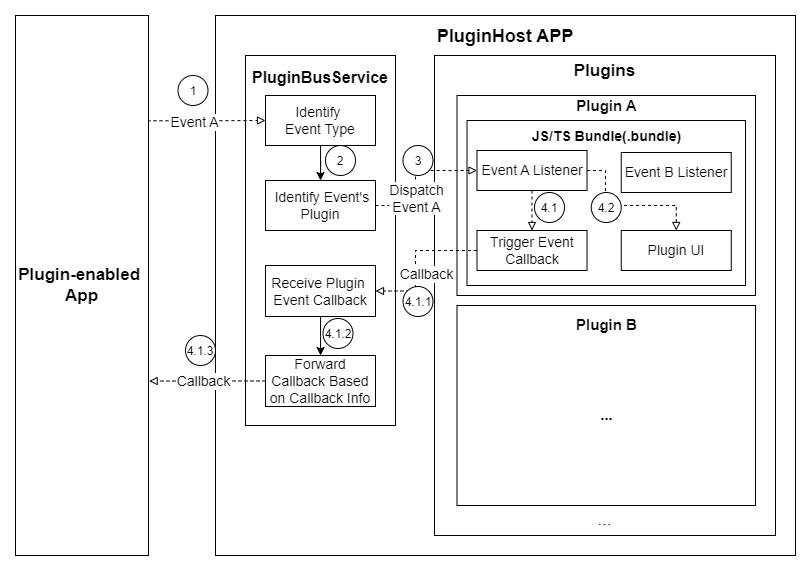
Button Event Listener

Plugins can register multiple buttons. To distinguish “which button was pressed”, listen for button events and read id from the event.
import { PluginManager } from 'sn-plugin-lib';

/**
 * Listen for native button press events.
 */
const subscription = PluginManager.registerButtonListener({
  onButtonPress: event => {
    console.log('button press:', event);
    console.log('button id:', event.id);
  },
});
registerButtonListener provides an event when the button is pressed. Common fields:
type ButtonEvent = {
  id: number;    // id passed during button registration
  name: string;  // button name
  icon: string;  // icon path passed during registration
};

Assign a unique id to each button, and dispatch by id in the callback (e.g., switch (event.id)).